

ПРИМЕЧАНИЕ: Для этого контента требуется базовая игра The Sims 3 для того, чтобы играть.
Get instant download of The Sims 3: 70s, 80s and 90s Stuff on PC with Key4game.shop
The top 3 reasons to play The Sims 3: 70s, 80s and 90s Stuff
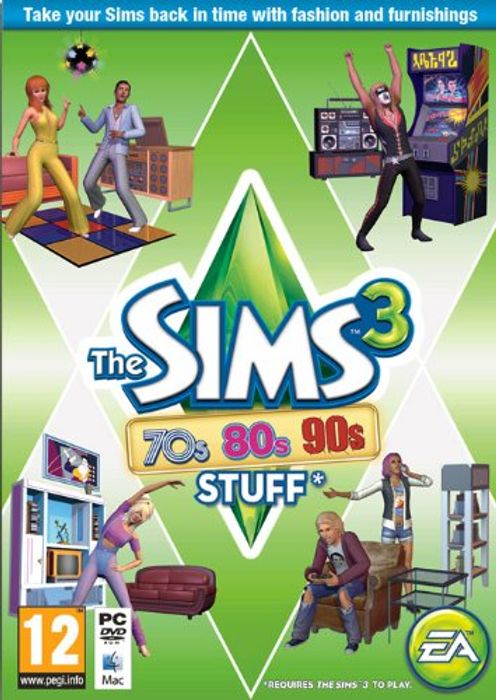
- Sport the disco, glam and grunge looks of the decades in The Sims 3: 70s, 80s and 90s Stuff!
- Put on the ’70s disco look with bell-bottom pants, the ’80s glam with shoulder pads and the ’90s grunge with a rumpled flannel shirt.
- Relive the trends of the past with new clothing, furniture, accessories and more.
What to know before buying The Sims 3: 70s, 80s and 90s Stuff
What’s included with The Sims 3: 70s, 80s and 90s Stuff?
Included is The Sims 3: 70s, 80s and 90s Stuff content for PC.
Is there any region lock for The Sims 3: 70s, 80s and 90s Stuff?
Этот продукт доступен по всему миру; блокировка по регионам отсутствует.
How will I receive my instant download for The Sims 3: 70s, 80s and 90s Stuff?
После одобрения оплаты ваш ключ к игре будет включен в письмо с подтверждением заказа. Вы можете получить доступ к ключу, перейдя по ссылке в письме. Далее вы можете активировать ключ на соответствующей платформе.
Если вы оформили предварительный заказ на игру, ключ будет доставлен вам на электронную почту за день до даты официального релиза (или раннего доступа). Вы также получите уведомление по электронной почте, когда ваш ключ станет доступен.
How to activate the key for The Sims 3: 70s, 80s and 90s Stuff
Activate with Origin:
- Sign up/Login to your Origin account here: http://www.origin.com/account
- Once you are logged into your Origin account, download the Origin client to your computer.
- Complete the installation of the Origin client on your computer.
- Open Origin client that has been installed and login with your new or existing username and password.
- Copy the key from Key4game.shop confirmation link to clipboard or write on a paper.
- Once you copy and paste the key Product Code into Origin, press “Enter” or click “Next”. Click “Next” again to confirm redeeming of the game. It has now been added to your Origin library.
If you run into any problems with the Origin program or your account, please contact EA Support here: https://help.ea.com/en/origin/origin/
The Sims 3: 70s, 80s and 90s Stuff details
- Boogie the night away and relive the groovy ’70s with bell-bottom pants, platform shoes and party all night under your disco ball.
- Throw on the totally rad ’80s legwarmers, leotard and have some fun with retro arcade systems.
- Show off your tattered jeans and grunge taste as you relive the days of the ’90s. Decorate your home with an industrial metal vibe and show everyone you don’t care about the establishment.
Want to get a free key to play The Sims 3: 70s, 80s and 90s Stuff?
Наша команда регулярно выбирает лучшие комментарии об игре. Обязательно поделитесь своим отзывом во вкладке "Обзор"!
What are the system requirements for The Sims 3: 70s, 80s and 90s Stuff?
MINIMUM for The Sims 3: 70s, 80s and 90s Stuff
- ProcessorFor XP 2.0GHz P4 processor or equivalent; For Windows Vista and Windows 7 2.4GHz P4 processor or equivalent
- Graphics128MB Video Card with support for Pixel Shader 2.0. Nvidia GeForce 6 series or better, and all NVidia G, GT, GTS, and GTX video cards. ATI Radeon series card 9500 series or better, and all ATI X, X1, and HD video cards; Intel Graphics Media Accelerator (GMA): GMA 3-Series, GMA 4-Series.
- MemoryFor XP 1 GB RAM / Windows Vista and Windows 7 1.5 GB RAM. For NVIDIA ION computers, the game requires at least 2 GB RAM.
- Disk spaceAt least 1.5 GB of hard drive space with at least 1 GB additional space for custom content and saved games. 7 GB of hard drive space if installing with The Sims 3.
- SystemXP SP2 / Vista SP1 / Windows 7
- OtherPlease note that the GeForce 6100 and 7100 cards are not supported.
Читать далее Видео









 Русский
  English (UK)